Product Updates
AI-Powered Translation Widget for WBCS
Date:
30.10.2025
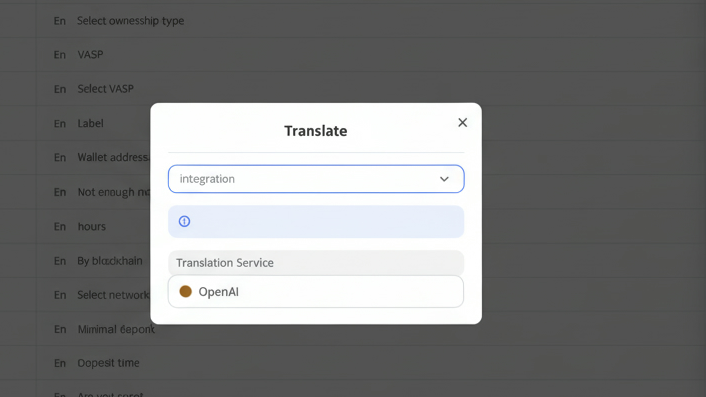
Managing multilingual content just became easier. The new Translation Widget with AI, powered by OpenAI, automates localization inside the Client Area → Translations and Texts modules—helping teams translate UI labels, buttons, and long-form content in seconds.
Where to Find It
Go to Client Area → Translations or Client Area → Texts.
Inside each translation drawer, click Translate at the top to open the AI Translation Widget.
How It Works
-
Select a Language
Pick your target locale tab (e.g., Es for Spanish or Fr for French). -
Choose Provider
In the Translation widget, open the Integration dropdown and select OpenAI. -
Auto-Generate Translations
Click Translate — the system connects to your configured OpenAI integration and automatically fills all fields with machine-translated text. -
Review & Edit
You can fine-tune results manually before saving. The translation preview updates instantly. -
Save Changes
Click Save to apply the AI-generated strings to your selected language.
Additional Options
-
Clone from Language: Copy all values from another locale before or after AI translation.
-
Add Custom Elements: Developers can add new labels (keys) and use the same widget to translate them.
-
PDF Export (optional): Export translated texts for review or offline QA.
Why It Matters
-
Speed: Instantly localize hundreds of short strings or content blocks.
-
Consistency: All translations are stored in one source of truth.
-
Flexibility: Combine human edits with AI efficiency.
-
Scalability: Supports any number of active locales configured in your system.
Best Practices
-
Always proof AI translations for tone and placeholders.
-
Use Clone to maintain structure before AI translation.
-
Coordinate with developers for new labels to appear correctly in the UI.
The AI Translation Widget (OpenAI Integration) turns manual translation work into a fast, controlled process.
With one click, your multilingual UI stays up-to-date across every project and locale.
digitize your
digitize
your
Business
today!
Unlock your potential with our powerful core solution — the foundation your business will grow on for years to come.


