Integrations
2026 Trends in Forex CRM Software: Operational Framework for Modern Brokers
Date:
03.03.2026
In the 2026 brokerage landscape, the focus has shifted from simple lead storage to complete operational orchestration. This forex crm guide outlines the essential technical transitions required to maintain a competitive edge. Modern brokers now require a back-office crm for brokers that functions as a single source of truth, integrating trading platforms, payment gateways, and compliance protocols into a unified ecosystem.
CRM/back-office value depends on tight integration with trading platform, payments, KYC and reporting. If those links are weak, teams fall back to manual checks, delayed approvals, and spreadsheet reconciliation.
For a practical example of how this operational model works in production, explore the WIFOX Trading Solution.
1) Trend → What to Check in Demo → KPI Impact
To ensure you are investing in a future-proof forex broker crm, use this matrix to evaluate high-level trends against business outcomes.
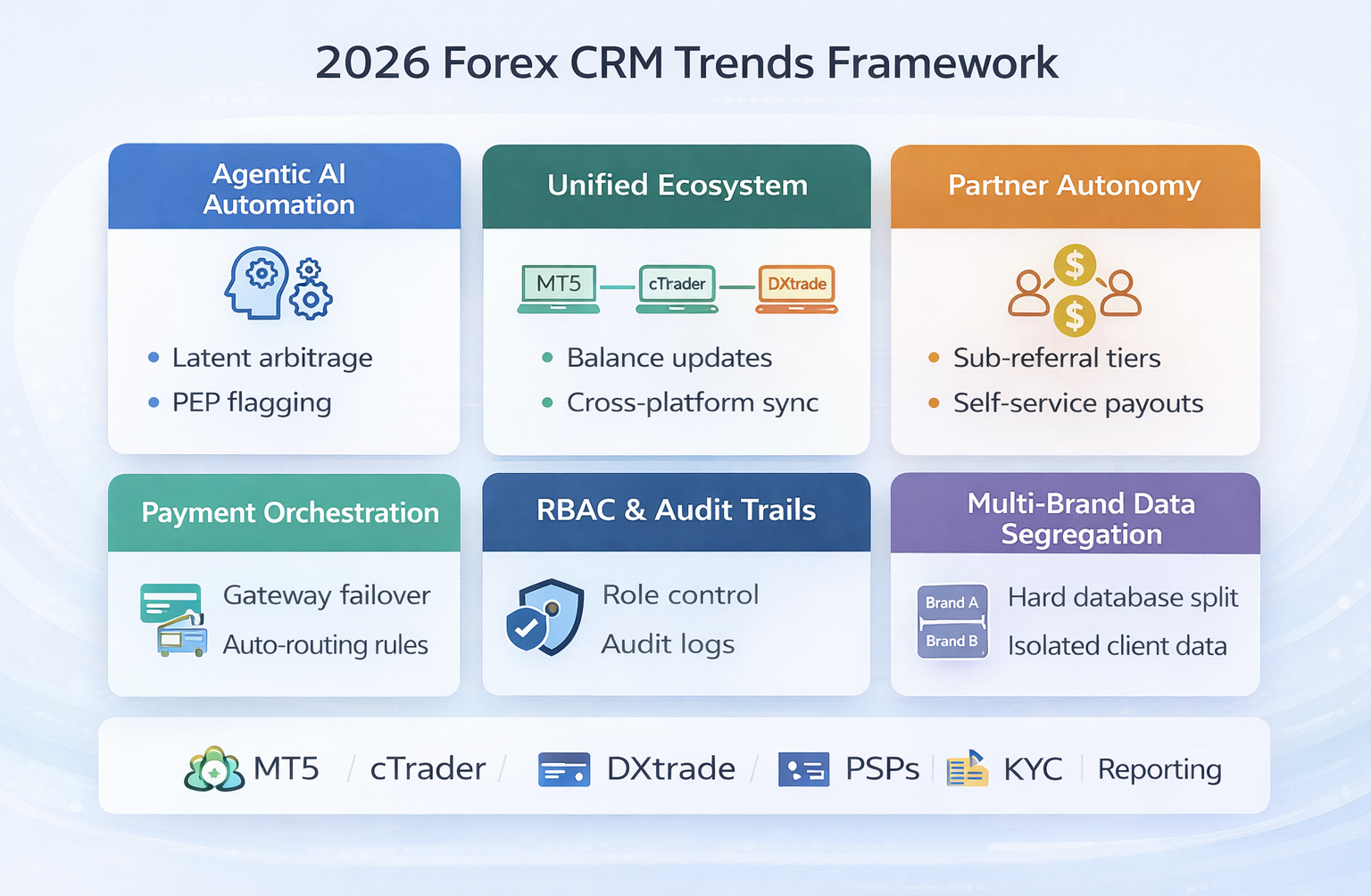
Agentic AI Automation
What to Check in Demo: Can the AI autonomously flag accounts for "latency arbitrage" or PEP hits?
KPI Impact: 40% reduction in Compliance manual review time.
Unified Ecosystem
What to Check in Demo: Ask to see real-time balance updates across MT5, cTrader, and DXtrade simultaneously.
KPI Impact: 25% increase in "Lifetime Value" due to frictionless fund movement.
Partner Autonomy
What to Check in Demo: Can IBs create their own sub-referral tiers without admin intervention?
KPI Impact: 15% growth in referral-based traffic volume.
2) The "Quick-Audit" Table: Trend → Practical Check → Red Flags
Use this block during a demo to quickly identify if a multi-brand crm is truly built for 2026 or is simply a legacy system with a new skin.
When vetting a forex broker crm, looking at a feature list is a waste of time—every vendor claims to have "automated KYC" and "MT5 integration." To find the truth, you have to look at the product’s DNA. Most systems follow one of four archetypes. The "best" one is simply the one that doesn't break your specific operating model.
Archetype 1: The Sales-First Engine (Conversion & Retention)
These platforms are built for the "hustle." They prioritize lead routing, high-velocity calling, and keeping sales reps on a tight schedule.
1) Best Fit: Brokerages where growth depends on aggressive funnel performance and rigid retention playbooks.
2) Demo Focus: Lead distribution logic, task automation, and team performance dashboards.
3) Red Flags: Payments and KYC feel like afterthoughts; withdrawals are treated as generic support tickets rather than financial transactions.
Archetype 2: The Operations-First Back-Office (Control & Auditability)
This is a true back-office crm for brokers. It prioritizes accountability over flashy pipelines. It’s designed for the compliance officer, not just the sales manager.
1) Best Fit: Highly regulated teams or those with massive support volume requiring "management by exception."
2) Demo Focus: Granular RBAC (Role-Based Access Control) matrix, depth of audit trails, and automated approval chains.
3) Red Flags: The system lacks automation (everything requires a human click), and there’s no clear "logic" behind why accounts are flagged.
Archetype 3: The Core-Ledger Orientation (Precision & Trust)
This system behaves like a core banking forex crm. It treats every cent like a bank would, focusing on the integrity of the ledger above all else.
1) Best Fit: Institutional-grade teams where reconciliation, audit logs, and transaction traceability are the heart of the business.
2) Demo Focus: Ledger logic, end-to-end transaction tracing (from deposit to wallet to MT5), and chargeback handling.
3) Red Flags: "Balance" is just a displayed number without a verifiable transaction history, or audit logs don't show the "Who, What, and When" of balance adjustments.
Archetype 4: The Ecosystem Suite (The One-Stop Shop)
This is the "all-in-one" bundle. You get the CRM, the bridge, the liquidity, and sometimes even the platform under one roof.
1) Best Fit: Fast-to-market startups that want to deal with only one vendor for their entire infrastructure.
2) Demo Focus: Deep integration between modules (is it actually one database?) and data portability.
3) Red Flags: Heavy vendor lock-in; you can't easily export your data or switch a single module without the whole house of cards falling.
The Selection Checklist: 6 Live Tests to Find the Truth
Don't let a salesperson drive the demo with a slide deck. Force them to perform these six live actions to see how the forex broker crm actually handles reality:
1) The Deposit Sync: Watch a deposit reflect across the wallet and the trading account simultaneously. If there’s a lag, your support desk will be flooded with "Where is my money?" chats.
2) The Withdrawal Audit: Have them process a withdrawal from Pending to Approved. Look at the resulting audit trail—does it prove who authorized the move?
3) The KYC Safety Net: Test a low-risk auto-approval vs. a high-risk flag (PEP/Sanctions). Does the system block the deposit automatically, or does it rely on a human seeing a note?
4) The RBAC Wall: Log in as "Sales" and try to view a client's bank details or withdrawal history. If you can see it, you have a massive internal security risk.
5) The Reporting Source: Build a custom report live. Is the data pulled in real-time, or is it a "cached" version that is 15 minutes old?
6) The Multi-Brand Test: This is the ultimate multi-brand crm test. Prove that a manager for "Brand A" cannot see, search for, or export the documents of a client in "Brand B."
Demo Red Flags: When to Walk Away
The "Vague Integration" Promise: They claim to "integrate with everything," but can’t show a live, bi-directional sync with your specific trading platform.
1) Filter-Based Segregation: If "multi-brand" just means clicking a filter to hide Brand B, your data isn't safe. You need hard database-level or permission-level boundaries.
2) Passive Audit Trails: If the system shows an action was taken but doesn't record the specific IP address, timestamp, and staff ID, it won't satisfy a regulator.
3) Manual-Only Withdrawals: If the system can't handle rule-based "Auto-Approvals" for small, low-risk amounts, your finance team will never be able to scale.
Whether you are looking for the rigid precision of a core banking forex crm or the flexibility of a multi-brand crm, your goal is the same: find a system that acts as a bridge to your growth, not a bottleneck to your operations.
4) Anonymous Micro-Cases: Operational Failures
The Payment Orchestration Gap: A mid-sized broker failed to use an orchestration layer for "Pending" transactions. During a high-volatility event, their primary gateway delayed 500+ deposits. Because the system couldn't auto-verify and route these to a secondary processor, the support team spent 48 hours manually reconciling balances.
The Multi-Brand Segregation Leak: A group running an offshore entity alongside a regulated EU brand used a system without "Hard-Wall" data segregation. A sales agent mistakenly used a master export to contact EU clients for a high-leverage offshore promotion, leading to a regulatory audit and a significant fine for data mishandling.
5) Roadmap: What to Implement First
This roadmap ensures a logical transition to a modern back-office crm for brokers without disrupting current trading operations.
Week 1: The Governance Layer (RBAC)
Define your Role-Based Access Controls. Ensure that Finance cannot see marketing notes and Sales cannot see bank details. This is the foundation of security and compliance.
Week 2: The Integration Layer (Sync)
Establish bi-directional sync with your trading platforms. Every leverage change or account block must happen on the server in milliseconds. Connect your first three primary payment gateways with failover rules.
Month 1: The Intelligence Layer (Automation)
Configure your automated IB rebate tiers and launch AI-driven "Churn Alerts." At this stage, your team should move from "processing data" to "managing exceptions."
6) FAQ: Selection & Operations
1) What is a back-office CRM for forex brokers?
It is a specialized system that manages the entire client lifecycle—onboarding, KYC, deposits, and trading account management—outside of the actual trading platform.
2) What is bi-directional sync?
It means the CRM and the trading platform (MT4/MT5) talk to each other. If a client deposits in the CRM, the balance updates on the platform immediately.
3) How long does a default go-live take?
A standard setup takes 2–4 weeks, while complex migrations involving historical data can take up to 8 weeks.
4) What is the difference between a CRM and a Core Banking system?
A core banking forex crm uses a double-entry ledger system to ensure every cent is accounted for, rather than just displaying a "balance" number.
5) Can you run multi-brand with data segregation?
Yes. A true multi-brand crm keeps client databases physically or logically separated so that Brand A data never mixes with Brand B.
6) How does AI improve retention?
By analyzing deposit frequency and trading volume, AI can flag a client who is "quietly leaving" before they actually withdraw their funds.
7) What is the minimum RBAC set?
You need at least four distinct roles: Sales, Compliance, Finance, and Super-Admin.
8) What delays a CRM launch?
Usually, delayed KYC provider API keys or poorly organized historical client data for migration.
Ready to evaluate a Forex CRM built for modern broker operations? Demo WIFOX to review live workflows for payments, KYC, RBAC, multi-brand control, and trading platform sync.
Demo Wifox to review:
1) Trader Room and onboarding flow
2) KYC and compliance workflows
3) payment and withdrawal operations
4) IB portal and commission logic
5) role-based permissions and audit trails
digitize your
digitize
your
Business
today!
Unlock your potential with our powerful core solution, completely free!


